
Trinity Sentinel
Project software · built by project managers

Project controls that think. For every project you run — and the program that holds them.

Sentinel reads your Primavera P6 schedules exactly, scores them against DCMA and GAO practice, computes earned value, drafts the variance narrative, and puts every project on one axis for the program review — inside your boundary, with no data egress, and without ever touching your database. Built by project managers who run DOE programs, for the project managers who run yours.

No data egressAI proposes · a person decidesBuilt for UCNI & CUIRuns offline
Demo videos

See it in action

Every screen you see is the real Sentinel application running on synthetic demo data — no customer or site information — and the people shown are AI-generated.

Overview

The 75-second overview

Sound on · press play
Walkthrough

Full product walkthrough (6 min)

The dashboard, schedule health, risk, earned value (EVMS), the assistant, the approval gate, the project report and the DOE Critical Decision gates — in the order a project manager uses them, with the engineers, project controls and the customer along the way.

Captioned · 6:20

Want to see it on your own schedule? Request a live demo →

The problem

The assembly is what costs you three days a month.

Your schedulers already produce good analysis. What costs them is the assembly — DCMA checks from one spreadsheet, earned value from another, a narrative written by hand, into a report that is stale the day it issues. And the modern AI tools that could help are cloud-only, so the cleared world gets none of it.

FragmentedA schedule tool, a cost tool, and a reporting tool — stitched together at painful cost, and only for the biggest programs.
ManualVariance narratives, schedule-health checks, and monthly reports are still assembled by hand, every period.
Locked out of AIWhere cloud AI is prohibited — which is most nuclear sites — the tools that could do the repetitive work cannot be installed at all.
One platform

Schedule, cost, risk, and reporting — one governed cycle.

Schedule

Schedule intelligence

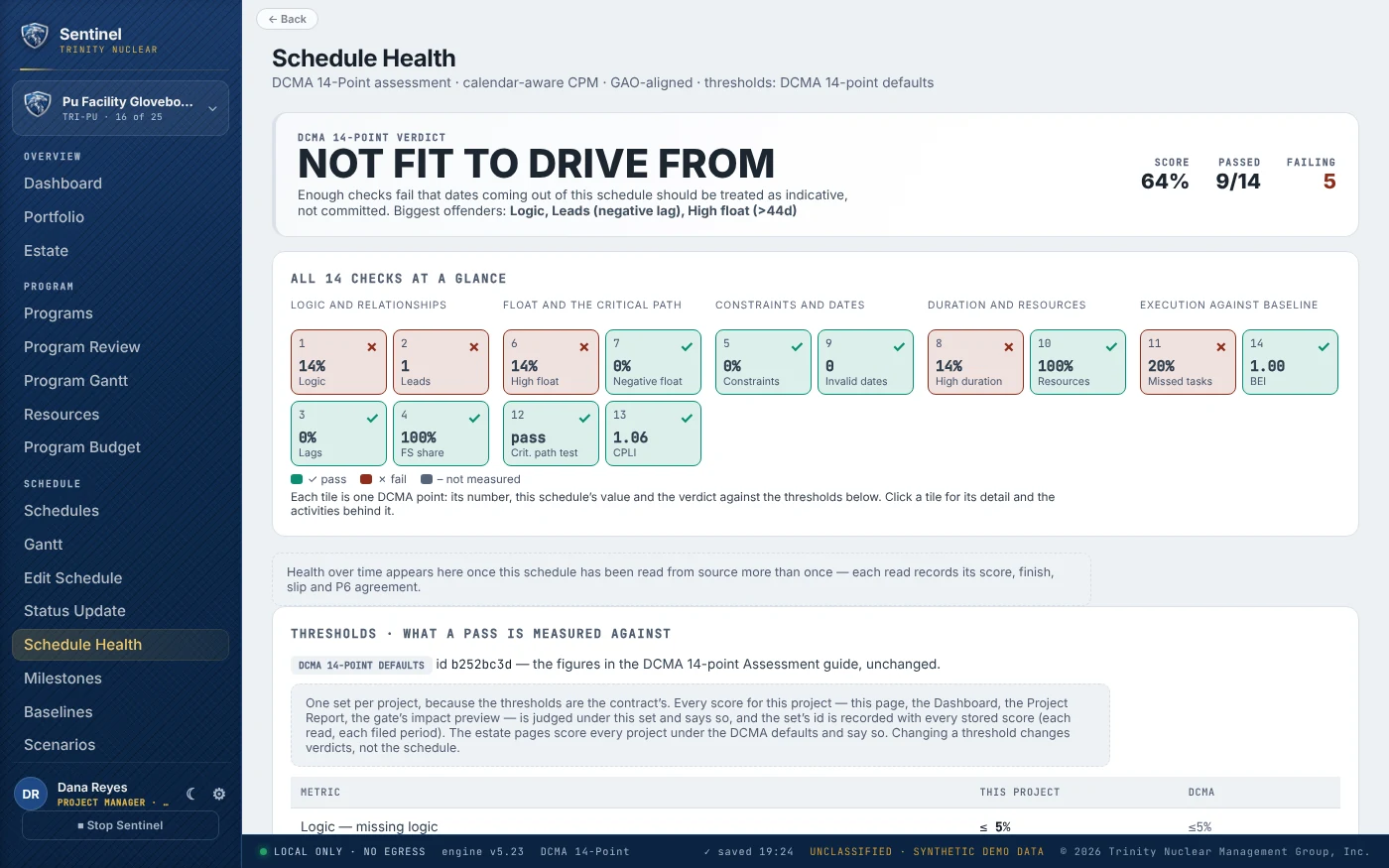
Reads XER, PMXML, MSPDI and CSV; recomputes the critical path with Sentinel's own calendar-aware CPM; scores logic, float, constraints and leads/lags against GAO and DCMA practice — with sourced fixes.

GAO 10 practicesDCMA 14-pointData date & backward pass
Cost

EVMS & cost engine

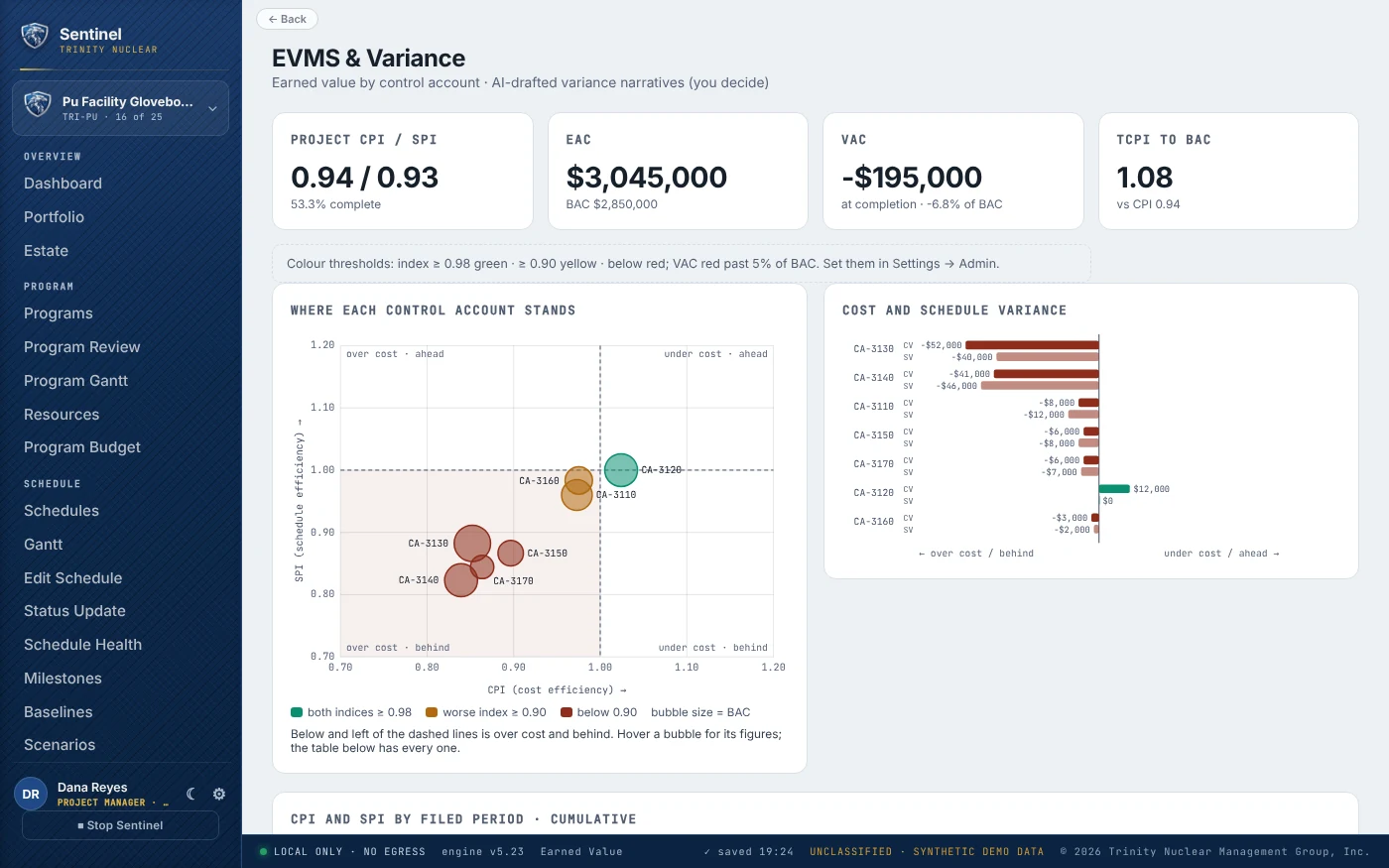
Deterministic earned value — CV, SV, CPI, SPI, EAC by the standard methods, VAC, TCPI — rolled up by WBS and control account, with the TCPI-vs-CPI credibility check that flags an optimistic forecast before a reviewer does.

EIA-748EAC / TCPINever AI-generated
AI

Variance narratives, drafted

The report everyone hates writing — root cause, impact, corrective action, recovery date — drafted from the numbers by a local model, for a named person to edit, approve, or reject.

Local modelHuman-approvedCited
Reporting

Monthly reporting, assembled

The period report generated straight from the data — including what changed since last period with a cause for every move — and sealed with an evidence package of everything it was made from. DOE and DoD report formats are on the roadmap.

Project ReportEvidence packagesIPMDAR / PARS (roadmap)
Integrity

Compare & merge

Diff two schedules — baseline vs. current, version vs. version, a sub's fragnet vs. the master — and integrate the changes as proposals, each approved and logged.

DiffGoverned mergeAudit log
Risk

Risk & forecast

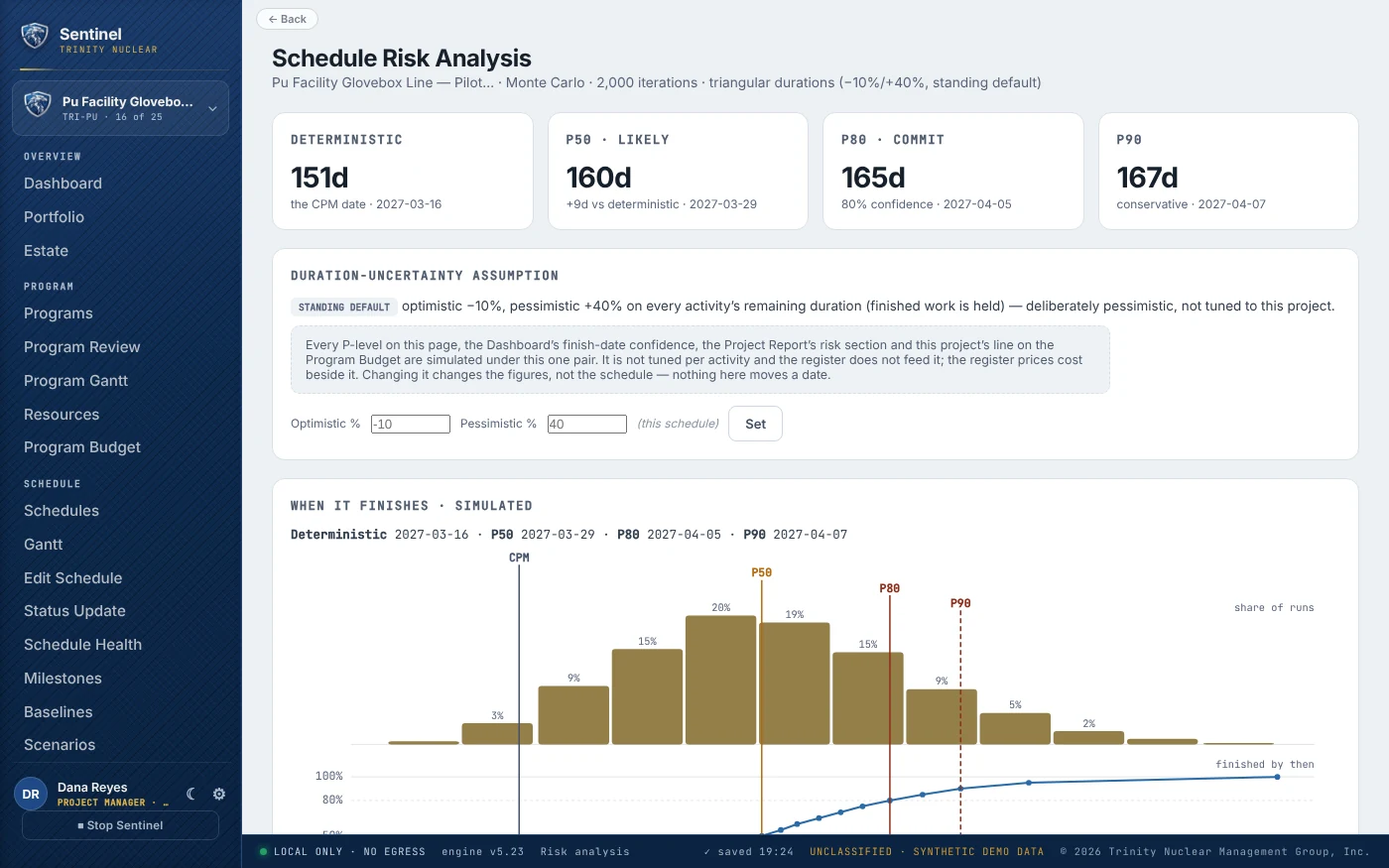
Statused forecasts from the data date, Monte Carlo finish confidence (P50 / P80 / P90), a risk register with three-point cost impacts and a modelled contingency position, and what-if scenarios — none of it touching the schedule of record.

Statused forecastMonte CarloCost-loaded riskNon-destructive
The program

One room. Every project. Run the way the review actually runs.

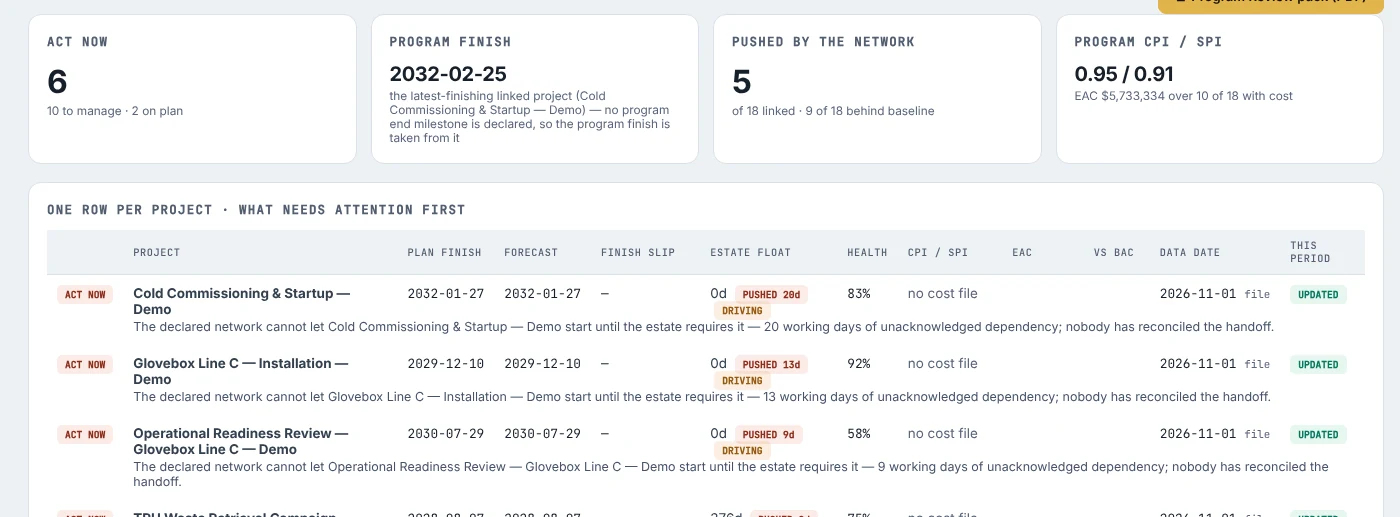
A program manager walks into the monthly review with one question per project: what needs attention first? Sentinel reads every schedule in the estate and answers it on one page — then the agenda the room actually walks: CPI and SPI, cumulative and this period; the variances; what changed in the schedule and the scope; what finished. Where projects share resources, money, or a handoff, it says so, with the coverage stated on every figure.

Trinity Sentinel Program Review: four program tiles — act now, program finish, pushed by the network, program CPI and SPI — above a one-row-per-project table ranked by what needs attention first
01 · Program Review

One row per project, attention first.

Forecast finish, slip, estate float and pushes, EVMS, data date, and one priority-ordered sentence per project — then, for each, the review block: CPI / SPI cumulative and for the period, control accounts in breach, schedule and scope changes applied through the gate, completions. Printable pack and workbook.

Answers: which project do I go help this month, and why?
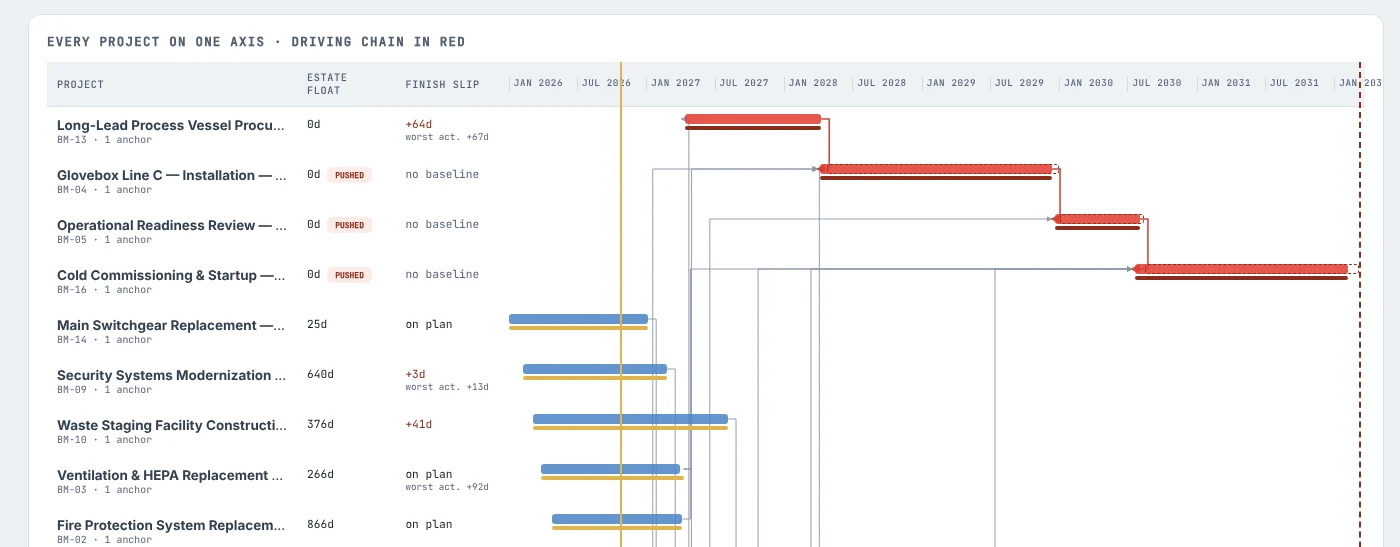
Trinity Sentinel Program Gantt: every project on one time axis with estate float, the driving chain drawn in red, links between projects and the status line
02 · Program Gantt

Every project on one axis.

Declared links between projects, the driving chain in red, and every push one project puts on another. A program slip scenario shows what a late anchor does to the rest — and writes nothing. Dependencies nobody has acknowledged are filed as Start On or After proposals at the successor's gate, for a person to decide.

Answers: if this one slips, who else moves?
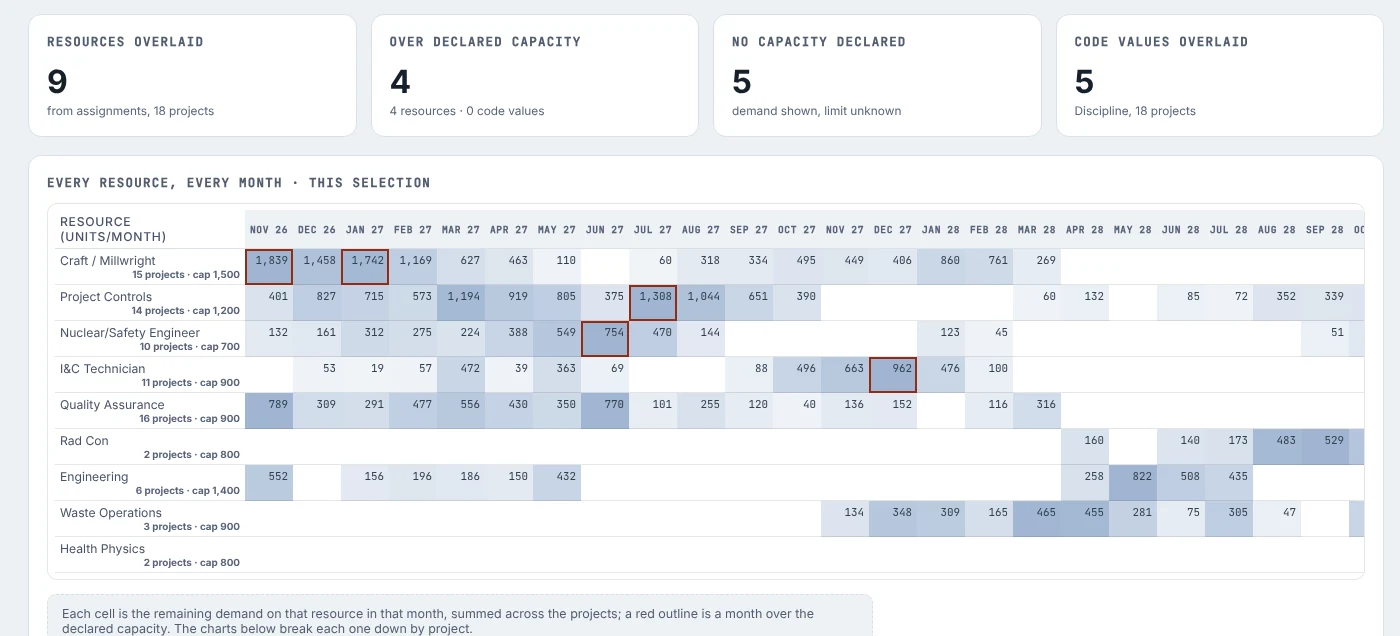
Trinity Sentinel Resources: resources overlaid, over-capacity months, undeclared capacity and code values across projects, with a per-resource histogram against declared capacity
03 · Resource Overlap

Same people, several projects, by month.

Same-named resources stacked across projects from the assignments, with activity-code concurrency as the fallback where a schedule is not resource-loaded. Declare a capacity and the months over it are marked; declare none and the page says the limit is unknown rather than pretending.

Answers: where are we double-booked, and when?
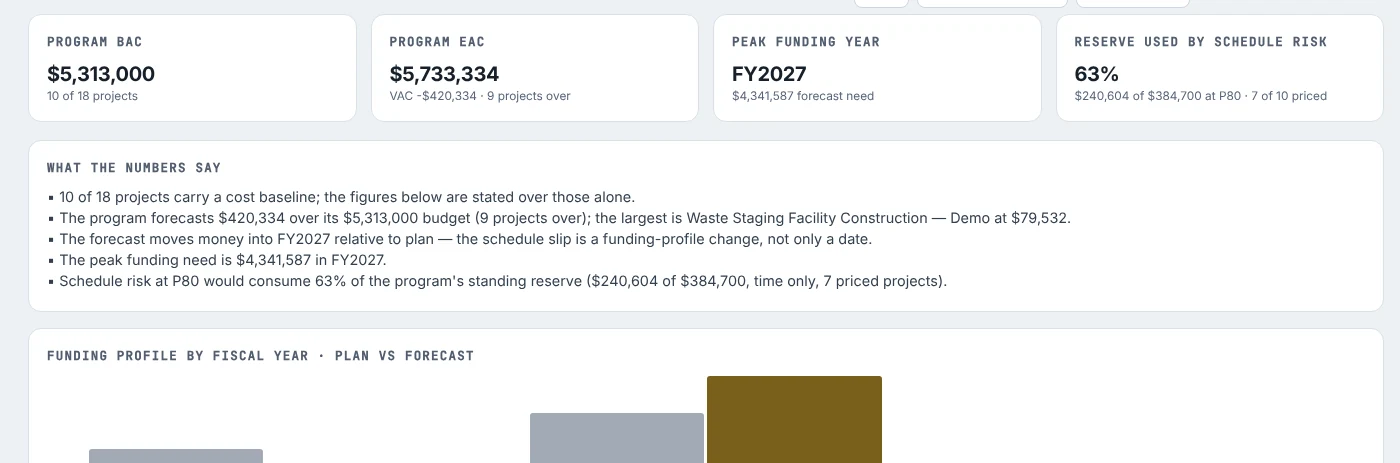
Trinity Sentinel Program Budget: program BAC and EAC, peak funding year, reserve used by schedule risk, a plain-language summary and a funding profile by fiscal year, plan against forecast
04 · Program Budget

The funding profile, phased over the schedule.

Plan against forecast by fiscal year, so a slip reads as the funding-profile change it is. EAC against budget ranked by project, with TCPI and the CPI-based EAC; the standing reserve set against the time-only cost of P80 schedule risk — before a single register risk is counted.

Answers: do we have the money in the year we need it?
05 · Cost risk, pricedThree-point cost impacts and drivers per risk, expected value, and a modelled contingency position for each project and across the program — alongside the time-only figure, never silently replacing it.
Coverage, statedIf eleven of eighteen projects carry a cost baseline, every program figure says it was computed over those eleven and names the seven it could not see. Nothing reads as 1.00 or zero by default.
Nothing movesThe program pages read. The only thing that changes a date anywhere in Sentinel is a proposal a named person approves at the gate — and the program slip scenario is not one.

Program views run on the same engine as the project pages, over the schedules already registered — nothing is re-typed. The review block's period is the calendar month of the installation's status date, and its agenda follows the shape of a DOE monthly project review. Screens above are cropped from build v5.23 on the synthetic demo estate — eighteen connected schedules on one fictional site, which one click builds on your own machine.

The deliverable

The report management reads — and the record behind it.

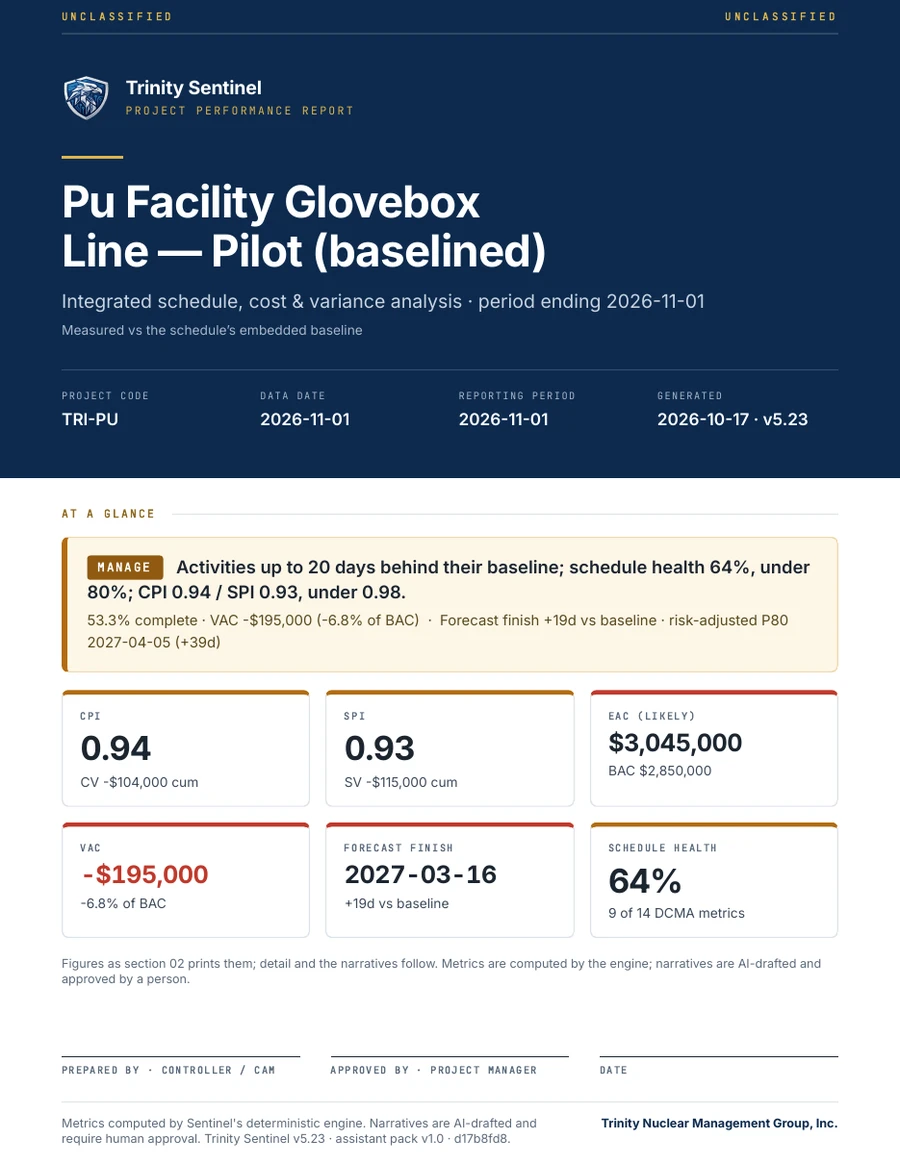
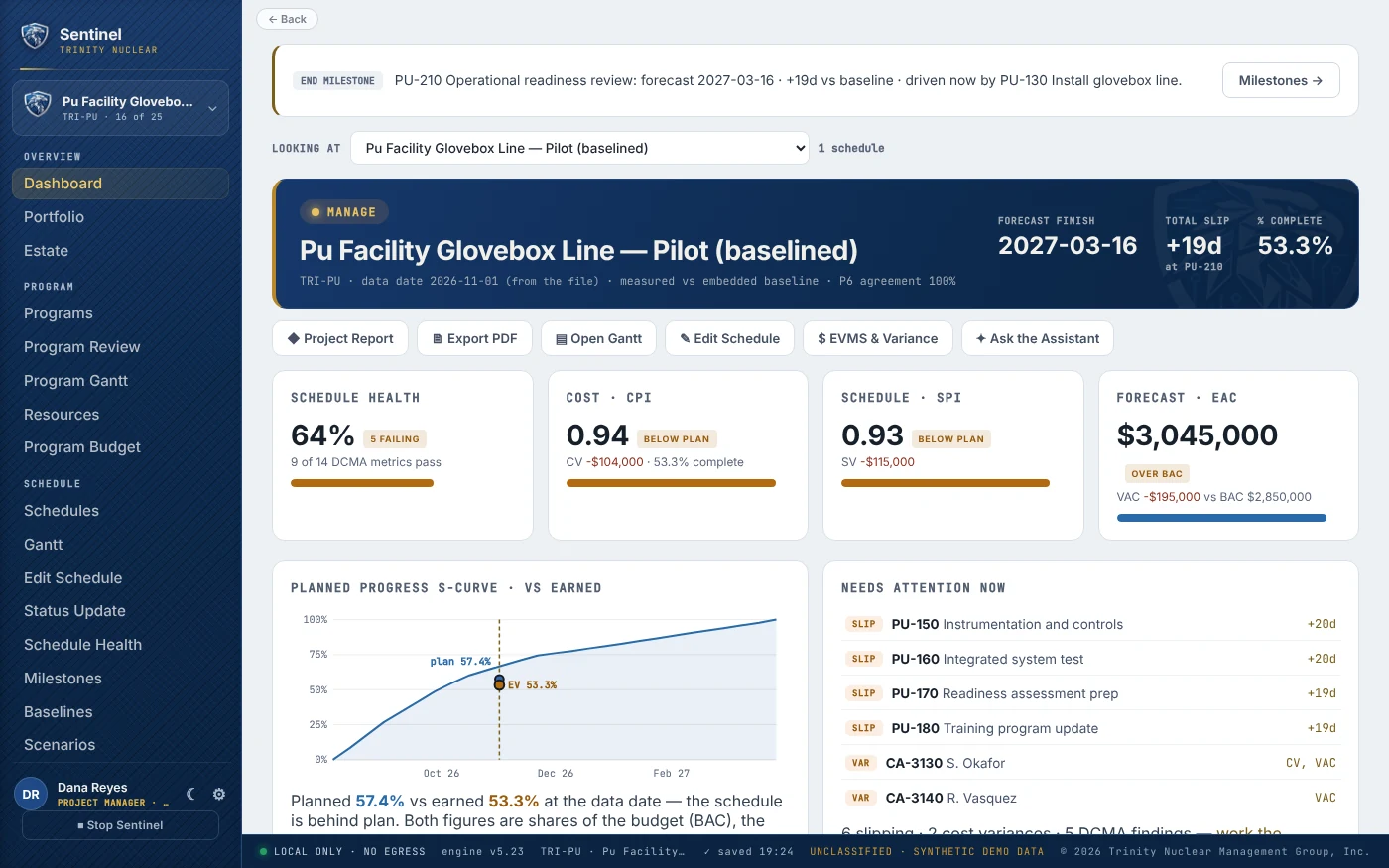
Page 1 of a Trinity Sentinel Project Report: a navy cover with the project name, data date, reporting period and build, then At a glance — a MANAGE verdict and six tiles for CPI, SPI, EAC, VAC, forecast finish and schedule health — above the signature block
PAGE 1 OF THE PROJECT REPORT · BUILD v5.23 · SYNTHETIC PILOT

One action assembles the period’s Project Report from what the engine has already computed: a cover that states the verdict and the six figures a manager reads first, performance at the data date, what changed since last period with a cause for every move, a variance record for every account outside a threshold, schedule and cost risk, and the signature block. PDF, Word or HTML — the view on screen, with its typefaces embedded so it prints the same on any machine.

Every figure, provedA test reads page 1 of the PDF and re-derives every headline figure from the tables behind it — 306 checks, every build. The cover cannot disagree with page 2.
Words a person approvesNarratives are drafted from the numbers by the local model and marked as drafted; a named controller edits, approves or rejects each one. The model may choose words — never a value.
Walk it before your dataTwo one-click builders put six complete synthetic demo projects — ahead, on plan, behind, recovering, re-baselined and closeout — and an eighteen-schedule connected program on your own machine, every section filled the way a real project’s would be.
The assistant

A colleague who knows every number — and stops at the gate.

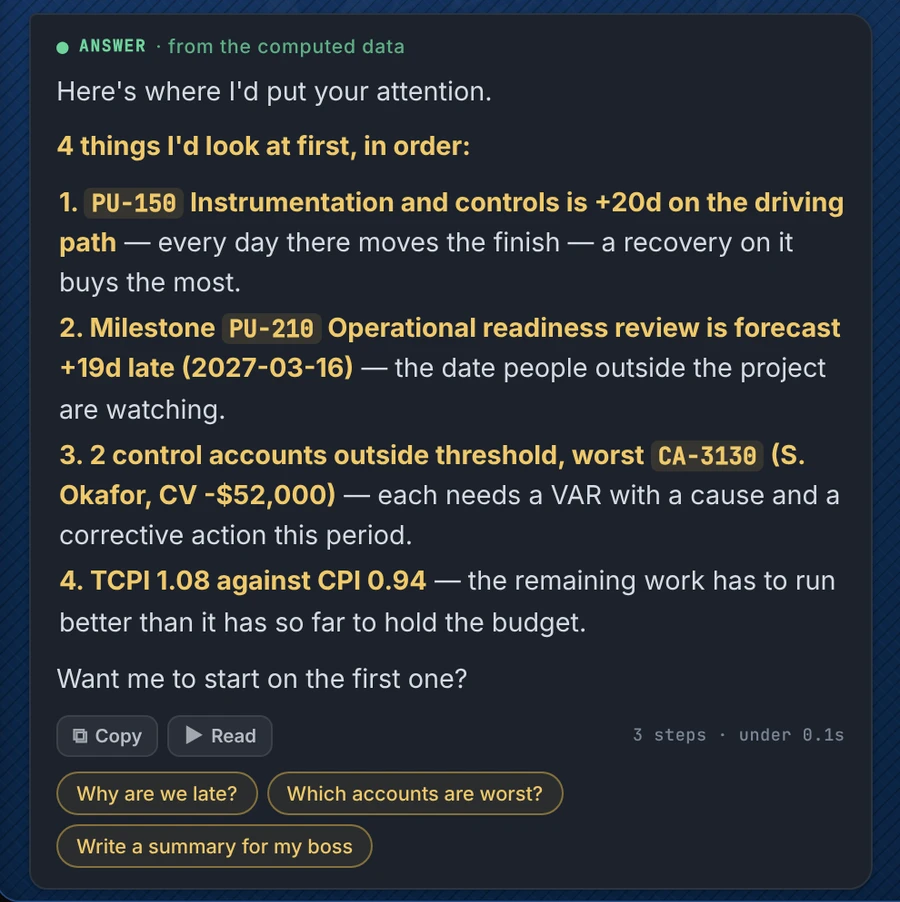
The Ask Sentinel panel: asked what to worry about this week, the assistant answers with four ranked items from the computed data — the driving-path slip, the late milestone, the control account outside threshold, and TCPI against CPI — then offers to start on the first
“WHAT SHOULD I WORRY ABOUT?” · BUILD v5.23 · SYNTHETIC PILOT

Ask it what a project manager asks on an ordinary day — what to worry about, why it is late or over budget, any activity or control account by its ID, what changed since last period, a status note for your manager. It answers from the same engine as every page, in plain words, and offers the next step. Ask it to change something and it drafts the change for a person to decide.

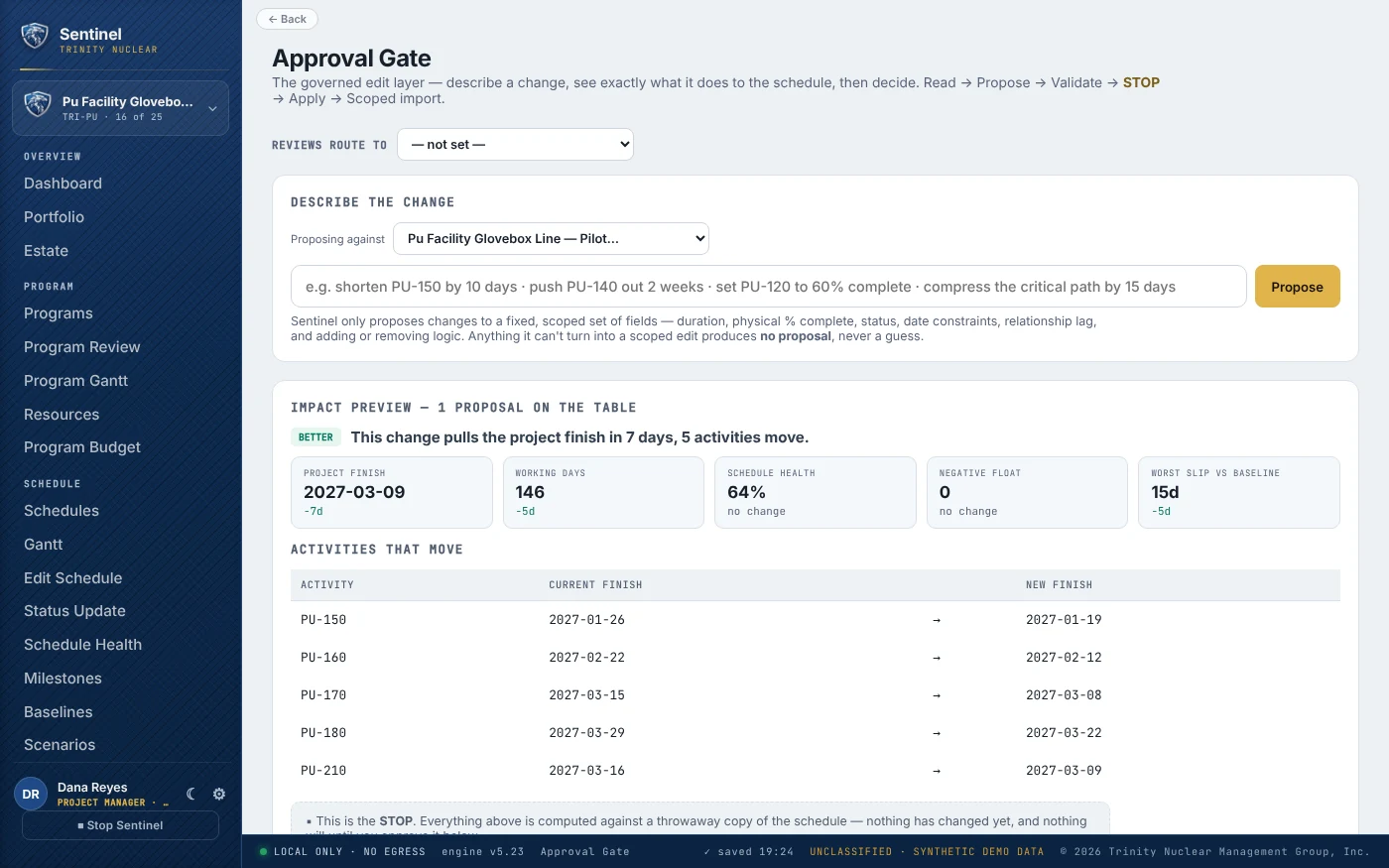
Drafts, never approvesShorten PU-150 by 10 days becomes a proposal on the approval gate with the finish in calendar and working days. Make it 5 revises it; withdraw that takes it back; approve it is refused.
A new schedule from a sentenceGive it the work in order with a duration each and a start date; the engine lays it out on the working calendar. Submitted, it becomes a request routed to a named approver — only their approval adds it to the library.
Honest by constructionIt runs on your machine and works with no model installed. A local model may choose words, never a value; a sentence claiming work it did not do is removed before you see it. Its answers are checked against the dashboard and the report on 25 schedules, every build.
How it works

AI proposes. A person decides. Every time.

One governed cycle sits behind every feature. It is what makes Sentinel trustworthy inside a controlled boundary — and what makes every change attributable to a named reviewer.

01

Ingest

Read the schedule or cost export. Read-only — P6 is never opened, never written.

02

Compute & draft

Deterministic engines do the math. The local model drafts the words.

03

Decide

A qualified controller approves, edits, or rejects each row. Nobody approves their own change.

04

Record

Source, rationale, reviewer, and date on every decision — the review artifact is the change-control record.

05

Write back

A scoped file your scheduler imports through P6's own wizard. Never an auto-push.

The stop is a feature. Sentinel has no "apply to system of record" button. Everything it produces is a proposal at a gate — which is the moment that lands with anyone who has sat through an audit.

See it work

A look inside Sentinel.

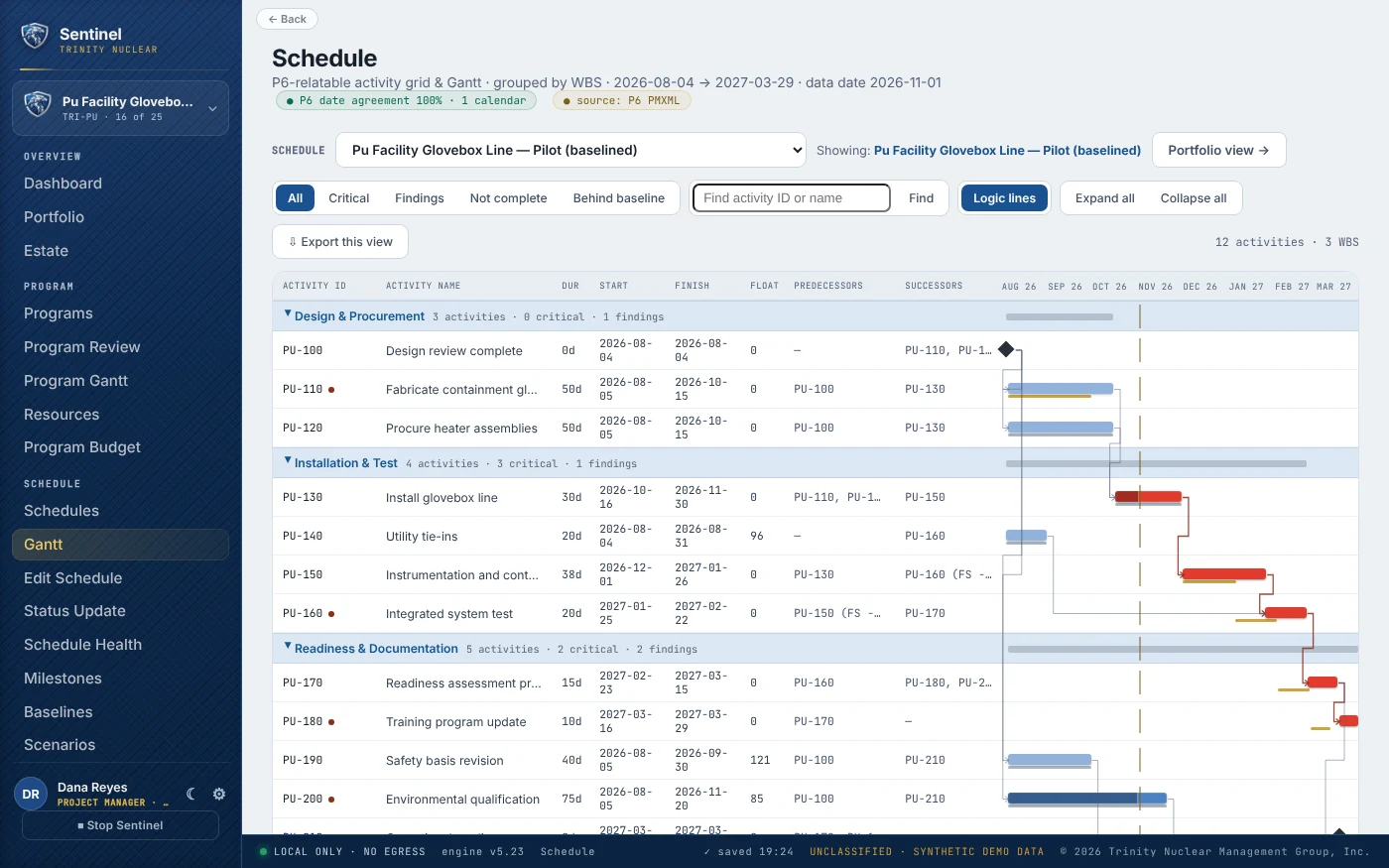
Trinity Sentinel schedule view, build v5.23: a P6-relatable activity grid and Gantt grouped by WBS with critical path, float, predecessors, milestones and findings, filters and search over the whole schedule, and the local-only no-egress status barBuild v5.23 · synthetic demo data · local model · no egress
100%
P6 date agreement — 706 of 706 finishes across the validation library, and 37 of 37 on a real site export.
0
Outbound network calls. No cloud, no API, no telemetry — enforced in code, not policy.
4
Schedule formats read natively: P6 XER, PMXML, MS Project MSPDI, and CSV.

ALL SCREENS · BUILD v5.23 · SYNTHETIC DEMO DATA · LOCAL MODEL · NO EGRESS

Tiers & pricing

Rigor that scales to the project. Pricing that says so.

Buy it once and run it on your own server. A one-time licence, priced by the people who work in it — read-only viewers are always free — and a yearly upkeep that keeps the engine and the rules current. Every project carries a profile (Capital under DOE O 413.3C, Reportable EVM, Operations, Task order), so a task order never carries EVMS overhead and a capital project never goes without it. All four profiles come with every licence.

One person

Desktop

A scheduler, a consultant or a small task order, on one machine.
$4,800
One-time licence · upkeep $1,050 / yr from year 2
  • The whole engine: schedule health, DCMA 14-point, critical path, status update
  • Earned value, variance narratives, risk
  • The project report
  • Assistant built in — runs with no model at all
  • No data leaves the machine
Ask about Desktop
Most projects start here
Up to 10 working users

Project Server

One capital project, one EVM contract or one operations group.
$36,000
One-time licence · upkeep $7,920 / yr from year 2
  • Everything in Desktop, on your server behind your proxy
  • Unlimited read-only viewers
  • DOE O 413.3C Critical Decision tracker
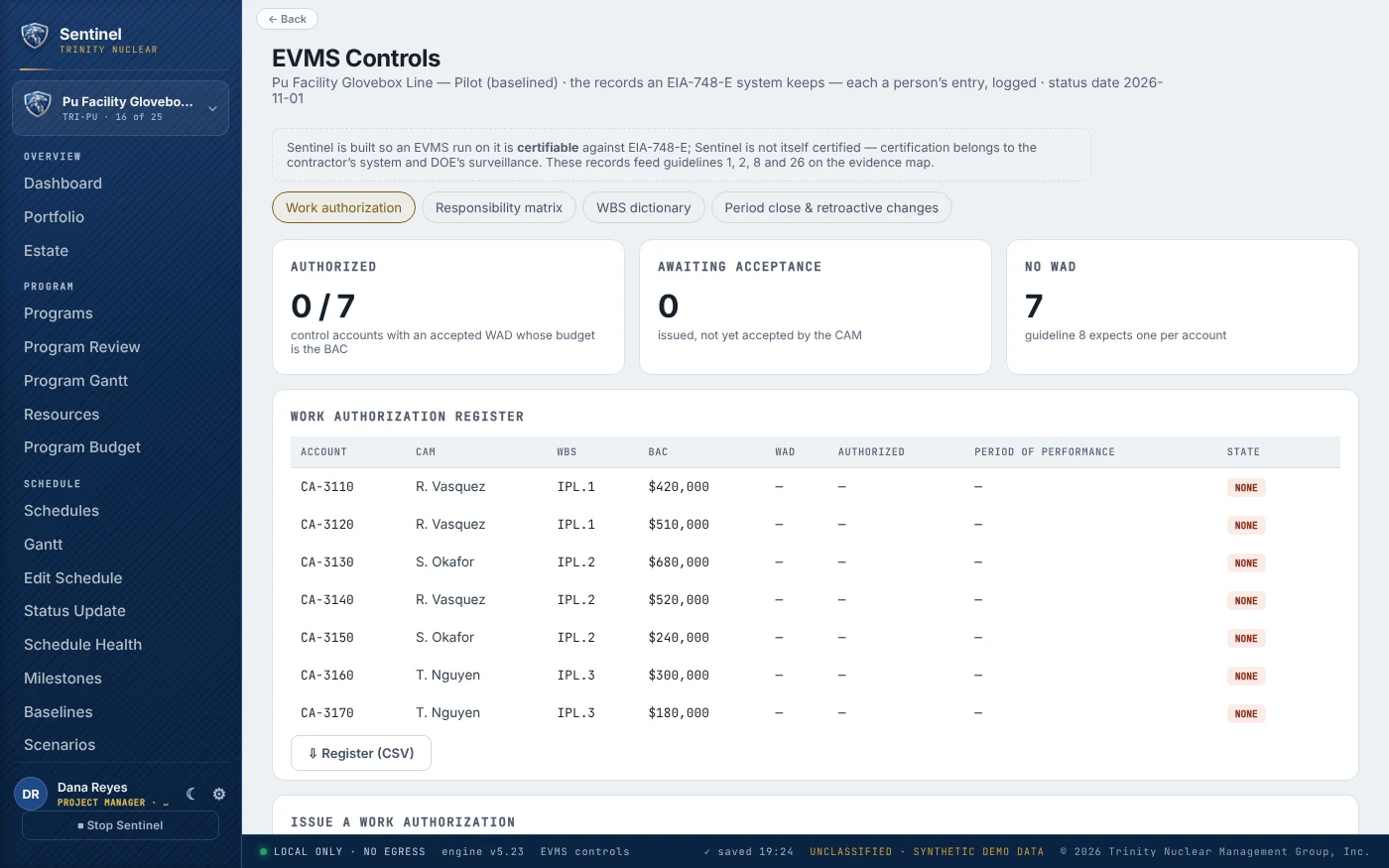
  • EIA-748-E evidence map and EVMS controls (WADs, RAM, period close) — certifiable, not certified
  • Approval gate, sealed change log, roles
Start with a pilot →
Up to 30 working users

Program Server

A program office or a site's project controls group.
By proposal
Scoped to your programs and working users · one-time licence plus yearly upkeep
  • Everything in Project Server
  • Program Review, Program Gantt and the review pack
  • Resources across a program and the whole estate
  • Program budget and cost risk
  • Cross-project links and slip scenarios
Request a proposal
Up to 100 working users

Site Server

A whole site or an M&O contractor.
By proposal
Scoped to your site, programs and working users · one-time licence plus yearly upkeep
  • Everything in Program Server
  • Every program and project on one server
  • Access by program
  • Working-user count set in the proposal
Request a proposal
Recommended first step

Paid pilot — one project, 60 to 90 days, $14,500 fixed.

It converts every open question into an experiment instead of an argument, on your schedule rather than a demo dataset. Your site's software and security review happens inside the pilot's 60 to 90 days, not after it. The full fee is credited against a server licence bought within 12 months. Validation runs on the machine holding the schedule and reports only aggregate metrics — your data never leaves your site, even during evaluation.

Success criteria, agreed up frontReproduces your P6 dates at ≥ 99% agreement · monthly report-prep time measured before and after, against a target agreed with you · finds schedule-quality issues your current process missed · scoped import loads without manual repair.
Scope a pilot →

Prices in USD, exclusive of taxes. Program Server and Site Server licences are priced in a written proposal, sized to the programs, sites and number of working users you need. Licences are one-time and include the first year of upkeep; from year two upkeep is 22% of the licence each year and brings every new build, ruleset updates as DOE orders, EIA-748 and DCMA thresholds change, a verification record with every build, support by email and phone, and one annual on-site or video health review. If upkeep lapses the software keeps running; it stops receiving updates. A working user is anyone who edits, proposes or approves; viewing is free. A per-seat subscription is available on request for buyers who must use operating funds. Founding sites — the first three production sites — receive 30% off their first server licence and a three-year price lock, in return for serving as a reference. Cleared or air-gapped installs, accreditation support and Sentinel-delivered services — Trinity runs the monthly assessment and delivers the report — are quoted after a scoping call. Sentinel assembles evidence for a contractor's EVMS self-certification; it never certifies a system or approves a Critical Decision.

Documentation

Read the manual before the meeting.

The public documentation set, all at build v5.25 (19 October 2026), with the licence and notices. Every document is UNCLASSIFIED and built from synthetic demo data. Each one opens in a new tab in your browser's PDF viewer — save it from there.

PDF
Capability OverviewWhat Sentinel does, for whom, and why it clears a boundary — the program pages, the report, the record, the assistant.
12 pages · 3.6 MB · build v5.25
PDF
10 · Program ManagementThe program views in three pages — review, Gantt, resources, budget, cost risk — and what Sentinel refuses to do.
3 pages · 2.4 MB · build v5.25
PDF
00 · OverviewThe four-page introduction — the problem, the cycle, the numbers.
4 pages · 1.1 MB · build v5.25
PDF
01 · How It WorksIngest, compute, decide, record, write back — step by step.
6 pages · 1.3 MB · build v5.25
PDF
02 · Technical ArchitectureEngines, data model, file round-trip, deployment shapes, and the verification battery.
7 pages · 1.1 MB · build v5.25
PDF
03 · Security & AI AssuranceNo-egress design, local model, the shared-server perimeter, and every gap — closed ones included, with the build that closed them.
6 pages · 1.1 MB · build v5.25
PDF
06 · Quick StartFrom install to first report — and the demo builders to walk it first.
6 pages · 1.1 MB · build v5.25
PDF
07 · User ManualEvery page, every control, every deliverable — the program pages, the demos and working with the assistant included.
33 pages · 6.5 MB · build v5.25
PDF
08 · Product RoadmapShipped, next and later — each stage gated on proof, with the two rules that never move.
1 page · 0.3 MB · build v5.25
PDF
12 · Licence & NoticesLicensed, not sold: the copyright statement, the LICENSE and every third-party notice, word for word from the build.
4 pages · 0.3 MB · build v5.25

Every document above is issued against the same build and reissued when the product changes.

Request a demo

Let's find out on one of your schedules.

Bring a P6 export. We'll show you the schedule-health score, the earned-value roll-up, and a drafted variance narrative — on your data, on a machine that never calls out.

30-minute walkthroughLive, on synthetic data or your own export — your call.
Pilot scoping on requestFixed fee, one project, success criteria agreed before we start.

Request a demo or pilot

Goes straight to Trinity — we respond personally, usually within a day.